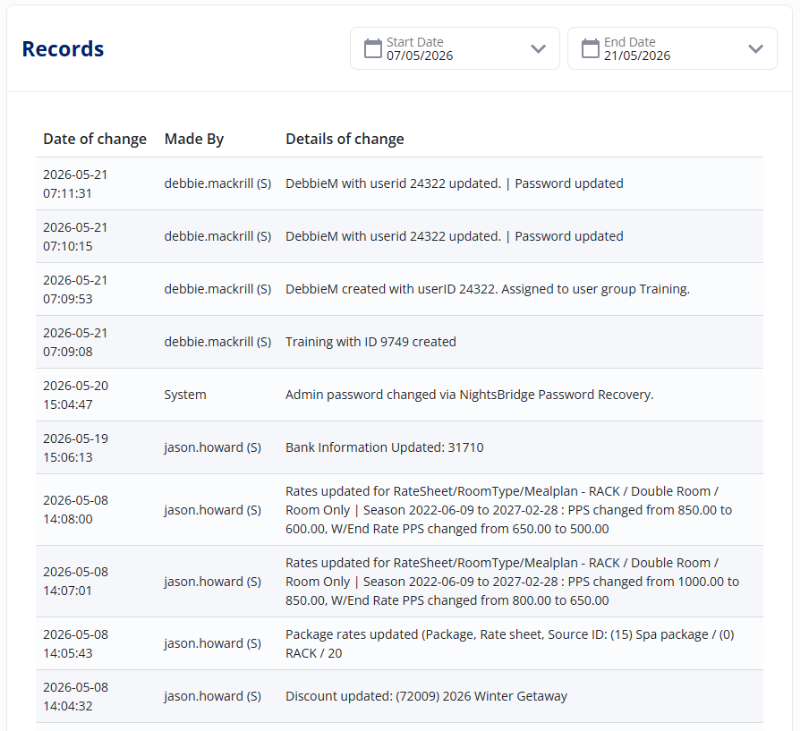
What can you track?
You can use the Security Audit to easily review any changes made to your:
- Basic Setup
- Rates and Minimum Stays
- Rooms and Room Types
- Rate Discounts and Specials
- Closeouts
A quick note on access
To keep your sensitive business information perfectly safe, the 'Users & Security' section is only visible to users who have full 'admin' rights, or those placed in a User Group with the right security clearance. If you don't see this option on your menu, it simply means your specific login hasn't been given the required user rights just yet!
How to check your setup history:
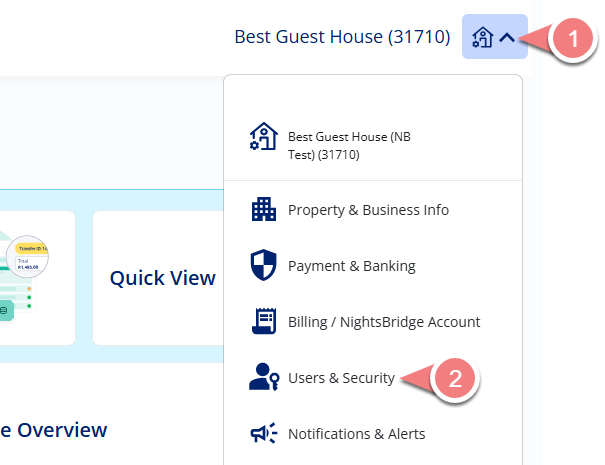
Step 1: Open your security settings
- Simply click to expand your Property Menu
- and select 'Property & Business Info'.
Step 2: Open the audit tool
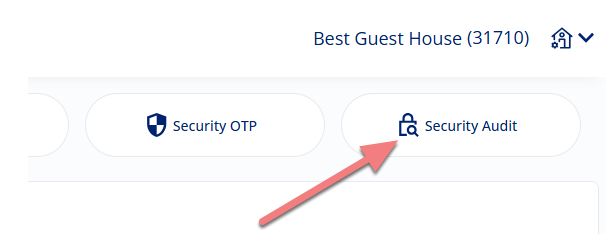
From your security settings, click over to the 'Security Audit' tab.
Step 3: Choose your dates
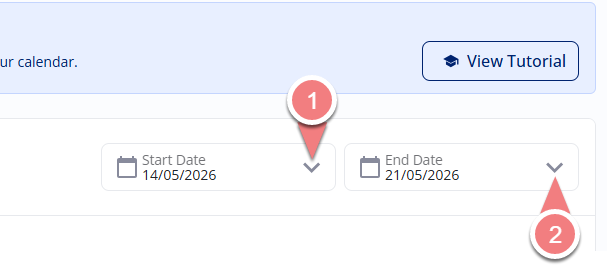
- Click into the 'Start Date' field to open up the calendar tool and pick your starting day.
- Do the exact same thing for your 'End date' field.
Step 4: Review your history
The system will instantly present you with a neat, chronological list of changes for those dates. For each change, you will easily be able to see the exact date and time it happened, the name of the user who made the change, and additional details about what was updated!